Particle Life — Three Agents, One Simulation
Write a PRD, run cpk init, and use the codepakt board to manage three AI agents building a particle life simulation. The board’s dependency graph prevents conflicts. Monitor progress from the dashboard, batch-review completed tasks, and add a post-launch UI tweak — a third agent (Gemini) picks it up from the board with zero onboarding.
Result: 15 tasks managed through the codepakt board, three agents, zero conflicts. Your role: write the PRD, review from the dashboard, and steer with one post-launch task. View source on GitHub →
The Setup
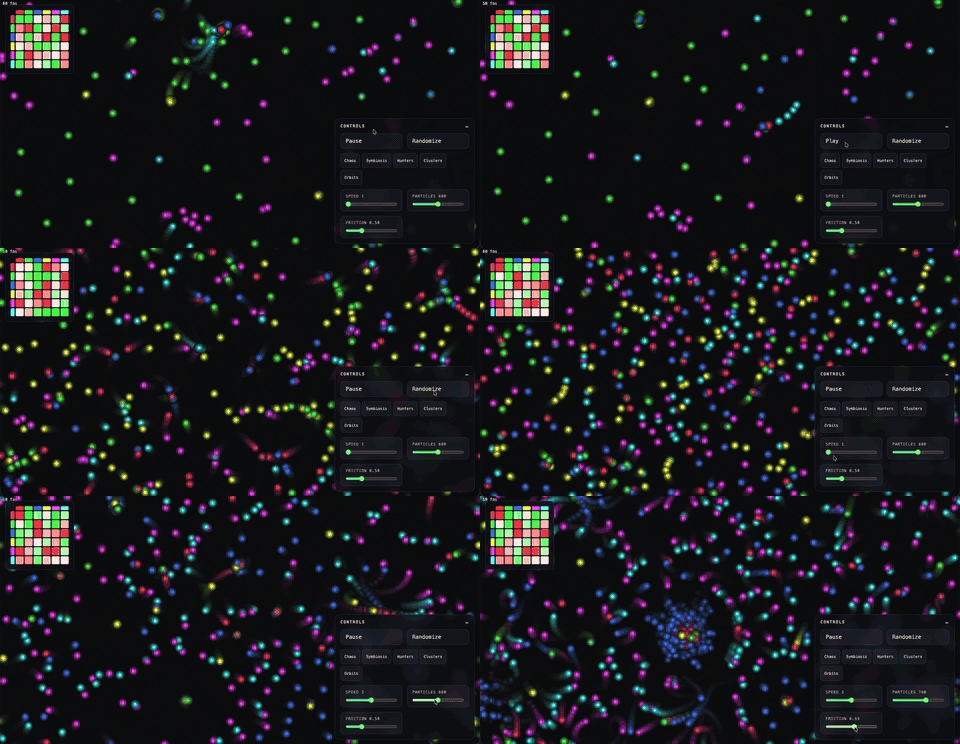
Goal: Build a browser-based particle life simulation — hundreds of colored particles with pairwise attraction/repulsion rules that produce emergent behavior (clustering, chasing, orbiting). Interactive rules matrix, controls, presets, glow rendering. Pure HTML/CSS/JS, no build step.
PRD: A 97-line requirements document covering particle physics, force rules, spatial partitioning, controls, presets, visual design, and acceptance criteria. Delivered as markdown.
Initialization:
cpk server start
cpk init --name particle-life --prd ./prd.md
An agent decomposed the PRD into 14 tasks across 5 epics with dependencies wired automatically.
The Agents
| Agent | Role | Tasks completed |
|---|---|---|
| claude | Physics engine, spatial partitioning, rules matrix UI, presets, visual polish, perf validation | 10 |
| codex | Particle data model, simulation loop + renderer, controls panel, play/pause buttons | 4 |
| gemini | Post-launch UI fix (rules matrix repositioning) | 1 |
No agent registration. Each agent called cpk task pickup --agent <name> and the server handed them the highest-priority available task with all dependencies met.
Task Breakdown
All 15 tasks from the actual codepakt board:
| Task | Title | Priority | Agent | Epic |
|---|---|---|---|---|
| T-001 | Project scaffold — index.html, style.css, main.js | P0 | claude | Core Simulation |
| T-002 | Particle data model & random initialization | P0 | codex | Core Simulation |
| T-003 | Rules matrix data structure & random generation | P0 | claude | Core Simulation |
| T-004 | Physics engine — force calculation, friction, wrapping | P0 | claude | Core Simulation |
| T-005 | Simulation loop & canvas renderer | P0 | codex | Core Simulation |
| T-006 | Spatial partitioning — grid-based neighbor lookup | P1 | claude | Performance |
| T-007 | Controls panel layout — HTML/CSS shell | P1 | codex | Controls |
| T-008 | Play/Pause & Randomize buttons | P1 | codex | Controls |
| T-009 | Simulation sliders — speed, particle count, friction | P1 | claude | Controls |
| T-010 | Rules matrix UI — color-coded display | P1 | claude | Rules Matrix |
| T-011 | Rules matrix UI — click/drag interaction | P1 | claude | Rules Matrix |
| T-012 | Preset system & 5 preset definitions | P1 | claude | Presets |
| T-013 | Visual polish — particle glow & motion trails | P2 | claude | Rendering |
| T-014 | Performance validation — 60fps at 600 particles | P2 | claude | Performance |
| T-015 | Move rules matrix to top-left corner | P2 | gemini | UI |
How Coordination Worked
Phase 1: Scaffold (17:00–17:07)
Tasks were created at 17:00. Claude picked up T-001 (project scaffold) at 17:05 — the only task with no dependencies. Both T-002 and T-003 were blocked until it completed.
Claude created the three files (index.html, style.css, main.js) and completed T-001 at 17:07. The dependency resolver immediately unlocked T-002 and T-003.
Phase 2: Core Simulation — Parallel Work (17:07–17:08)
Codex picked up T-002 (particle data model) while Claude simultaneously started T-003 (rules matrix data structure). Two agents, same main.js file, no conflict — because the dependency graph ensured they were working on independent data structures.
Both completed within seconds of each other. T-004 (physics engine) and T-005 (simulation loop) unlocked.
Phase 3: Engine + Renderer (17:07–17:09)
Claude built the physics engine (T-004) — pairwise force calculation with toroidal distance, linear falloff, friction damping. Codex built the simulation loop and canvas renderer (T-005) — requestAnimationFrame loop with particle drawing.
T-004 completed at 17:08, unlocking T-006 (spatial partitioning) and T-005 completed at 17:08 as well, unlocking the controls tasks and T-013 (visual polish).
Phase 4: Peak Parallelism (17:09–17:11)
The dependency graph opened wide. Four tasks ran concurrently:
- Claude: T-009 (sliders), T-010 (rules matrix display)
- Codex: T-008 (play/pause + randomize buttons)
- Claude: T-013 (glow + motion trails)
Both agents writing to main.js and style.css at the same time. The task boundaries kept them in different parts of the files — Codex wiring button event handlers while Claude built the rules matrix DOM and glow shader.
Phase 5: Finishing Touches (17:11–17:13)
Claude knocked out the remaining tasks in sequence: T-011 (matrix click/drag interaction — already partially done with T-010), T-012 (five presets: Chaos, Symbiosis, Hunters, Clusters, Orbits), and T-014 (performance validation).
T-014 was the most significant: Claude replaced the original per-particle shadowBlur (expensive) with pre-rendered offscreen glow sprites. This single optimization brought the simulation to 60fps at 600 particles.
All 14 tasks completed at 17:13 — 8 minutes from first pickup.
Phase 6: Review (19:46)
The simulation was reviewed ~2.5 hours later. All 14 tasks were batch-approved from the dashboard. The simulation worked: emergent behavior, interactive controls, presets producing visually distinct patterns.
Phase 7: Post-Launch Fix — Gemini Enters (19:48–19:51)
After review, T-015 was added from the dashboard: “Move rules matrix to top-left corner.” This task was assigned to Gemini — a third agent that had never touched this codebase.
Gemini picked up T-015, read the current CSS, changed .matrix-panel positioning from top-right to top-left, and completed the task in under 3 minutes. No context transfer. No onboarding doc. The task description and current file state were sufficient.
What Shipped
A complete particle life simulation:
- 400–1000 particles across 6 species with distinct colors
- Pairwise force rules (attraction/repulsion) via NxN matrix
- Spatial grid partitioning for O(n) neighbor lookup
- Toroidal wrapping (particles wrap at edges)
- Interactive rules matrix — click to cycle, drag to fine-tune
- 5 named presets (Chaos, Symbiosis, Hunters, Clusters, Orbits)
- Play/Pause, Randomize, Speed/Count/Friction sliders
- Glow rendering with pre-rendered sprites + motion trails
- FPS counter
- Dark theme, glass-morphism controls
- 60fps at 600 particles on a 2020+ laptop
- Zero external dependencies
- 3 files:
index.html,style.css,main.js
By the Numbers
| Metric | Value |
|---|---|
| Total time (core build) | ~8 minutes |
| Total time (with review + fix) | ~13 minutes |
| Agents | 3 (Claude, Codex, Gemini) |
| Tasks created | 15 |
| Tasks completed | 15 |
| Merge conflicts | 0 |
| Task collisions | 0 |
| Post-launch fixes | 1 (UI repositioning) |
| External dependencies | 0 |
| Lines of code | ~630 (484 JS + 145 CSS + 40 HTML) |
Takeaways
The board’s dependency graph is the coordination layer. Three agents shared the same files without conflicts — not because agents are smart about coordination, but because codepakt’s dependency graph serialized access where it mattered and allowed parallelism everywhere else. No need to manually sequence work.
The dashboard is your control surface. All 15 tasks monitored from one screen, completions batch-reviewed, and a post-launch fix added directly from the board. No terminal switching, no agent-specific workflows — one board for the whole project.
Adding a task from the dashboard steers agents in real time. After reviewing the build, T-015 (move rules matrix) was added from the board. Gemini picked it up from the task queue. No need to open a terminal or talk to the agent — just add a task and it gets done.
Any agent can join via the board. Gemini entered the project with no context beyond the task description and current file state. Codepakt’s task board is the onboarding — the task tells the agent what to do, and the codebase tells it how.
Task decomposition gives you granular review. Each of the 15 tasks is independently reviewable. Approve, reject, or request changes per task — not per agent session. This is finer-grained control than reviewing a single large PR.
cpk init to working simulation — you write PRD, not code. The developer’s contribution was a 97-line PRD and dashboard oversight. Codepakt handled task decomposition, dependency ordering, agent pickup, and the audit trail.