Snake Game — Two Agents, One Board
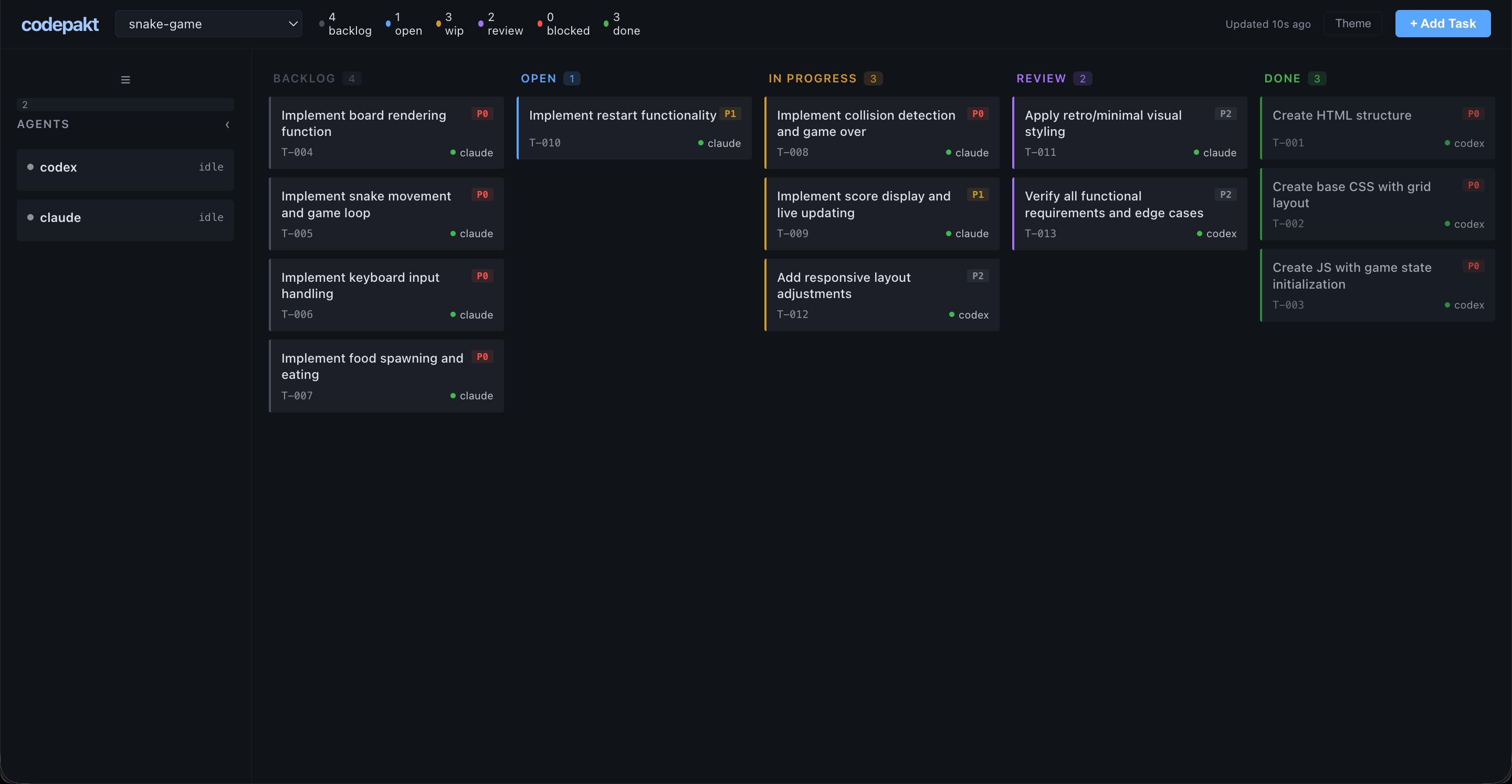
Write a PRD, run cpk init, and use the codepakt dashboard to manage two AI agents building a browser-based Snake game. The board handles task decomposition, dependency ordering, and agent pickup. Monitor progress, review completed tasks, and add a post-launch fix directly from the dashboard — an agent picks it up and resolves it autonomously.
Result: 14 tasks managed through the codepakt board, all completed. One bug caught during cross-agent testing, one post-launch fix added from the dashboard. Your role: write the PRD, monitor the dashboard, review, and steer. View source on GitHub →
The Setup
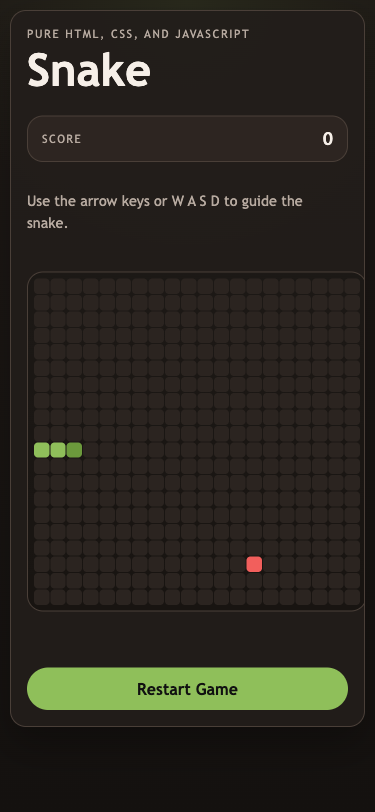
Goal: Build a classic Snake game using only HTML, CSS, and JavaScript. No frameworks, no canvas, no dependencies.
PRD: A 13-section product requirements document covering game board (20x20 grid), snake behavior, food spawning, collision detection, scoring, restart, responsive layout, and accessibility. Delivered as a markdown file.
Initialization:
cpk server start
cpk init --name snake-game --prd ./prd.md
The PRD was stored in the knowledge base. An agent read it and decomposed it into 13 tasks with dependencies and verification commands.
The Agents
| Agent | Role | Tasks completed |
|---|---|---|
| codex | Scaffolding + structure + responsive polish + testing + post-launch fix | 6 |
| claude | Game logic + input handling + styling + verification + code review | 8 |
No agent registration. No capability matching. Both agents called cpk task pickup --agent <name> and the server handed them the highest-priority available task.
Task Breakdown
All 14 tasks from the actual codepakt board:
| Task | Title | Priority | Agent | Time |
|---|---|---|---|---|
| T-001 | Create HTML structure | P0 | codex | 12 min |
| T-002 | Create base CSS with grid layout | P0 | codex | 12 min |
| T-003 | Create JS with game state initialization | P0 | codex | 13 min |
| T-004 | Implement board rendering function | P0 | claude | < 1 min |
| T-005 | Implement snake movement and game loop | P0 | claude | 3 min |
| T-006 | Implement keyboard input handling | P0 | claude | 3 min |
| T-007 | Implement food spawning and eating | P0 | claude | 3 min |
| T-008 | Implement collision detection and game over | P0 | claude | 3 min |
| T-009 | Implement score display and live updating | P1 | claude | < 1 min |
| T-010 | Implement restart functionality | P1 | claude | < 1 min |
| T-011 | Apply retro/minimal visual styling | P2 | claude | < 1 min |
| T-012 | Add responsive layout adjustments | P2 | codex | 1 min |
| T-013 | Verify all functional requirements and edge cases | P1 | codex + claude | 24 min |
| T-014 | Desktop should not scroll | P1 | codex → claude (review) | ~15 min |
T-004, T-009, T-010, T-011 completed in under a minute — the previous agent had already implemented the functionality. The pickup agent verified it was done and marked review.
T-014 was added from the dashboard after the initial build was complete — a real-world post-launch fix.
How Coordination Worked
Phase 1: Scaffolding (codex)
Codex picked up T-001, T-002, T-003 — the P0 structural tasks. These had no dependencies. Codex built the HTML shell, CSS grid layout, and JavaScript state initialization in parallel.
While codex worked on structure, claude couldn’t pick up game logic tasks yet — they depended on the scaffolding. The deps_met flag kept them in backlog.
Phase 2: Game Logic (claude)
Once codex moved T-001/T-002/T-003 to review, dependencies resolved automatically. Claude picked up T-005 (movement), T-006 (input), T-007 (food), T-008 (collision) in sequence.
Some tasks (T-004, T-009, T-010) were already implemented by codex as part of the scaffolding. Claude verified them and marked done.
Phase 3: Polish + Testing (both)
Codex handled responsive layout (T-012). Claude handled visual styling (T-011). Then both agents tackled T-013 — the verification task.
The Bug
T-013 was the most interesting task. Claude ran 13 test scenarios and found a real bug:
The problem: The keyboard input handler checked direction reversals against direction (the last applied direction) instead of nextDirection (the buffered input). This meant rapid key presses could queue an opposite direction before the game loop applied the first one, causing the snake to reverse into itself.
// Before (buggy):
if (newDir === OPPOSITES[direction]) return;

// After (fixed):
if (newDir === OPPOSITES[nextDirection]) return;
Codex picked up the fix and re-verified. Both agents confirmed the bug was resolved.
This is exactly the kind of edge case that emerges when two agents work on the same codebase — one writes the input handler, another tests it thoroughly, and the bug surfaces because the tester isn’t anchored to the original implementation assumptions.
Phase 4: Post-Launch Fix (dashboard → codex → claude)
After the game shipped, a quick check revealed the desktop layout scrolled on shorter viewports. Instead of fixing it manually, T-014 was added directly from the dashboard UI — click ”+ Add Task”, type the title, set P1 priority, done.
Codex was pointed at the project and asked to check for open tasks. It queried the board, found T-014 unassigned, and picked it up at 15:43.
The debugging loop: Codex didn’t guess at the CSS. It spun up a local server, launched Playwright via MCP, and measured actual DOM geometry — scrollHeight, innerHeight, getBoundingClientRect() on every layout element. It found the root cause: --board-size: min(78vmin, 560px) was purely width-driven, so on shorter desktop viewports the shell exceeded the screen height.
The fix required three iterations, each verified by re-measuring in the browser:
- First attempt —
calc(100dvh - 360px): Scroll eliminated, but status text clipped 12px below the card bottom. Measured viastatus.bottom - shell.bottom. - Second attempt —
calc(100dvh - 392px): Status visible, but game-over text collided with restart button. Measured viastatus.bottom - actions.top. - Final fix —
calc(100dvh - 440px)+ gap reduced from 14px to 8px: Full stack (header, HUD, board, status, button) fits cleanly. Both desktop (1440x900) and mobile (390x844) verified.
The knowledge base workaround: After completing the task at 15:47, codex wanted to record its detailed debugging process. It tried cpk task update to append notes, but discovered that the command doesn’t support adding notes after completion. Rather than giving up, it independently chose to write a learning doc to the knowledge base at 15:49:
cpk docs write --type learning \
  --title "T-014 Debug and Verification Notes" \
  --tags "T-014,layout,css,verification" \
  --author codex \
  --body "..."
The doc includes the full debugging path: how it identified the root cause, why each iteration failed, the exact CSS properties changed, and the Playwright assertions used for verification. Nobody told it to do this — the agent hit a tool limitation, adapted, and found an alternative path to record its work.
The review: Claude was then asked to review T-014. It read the CSS changes, verified the three-layer approach (dynamic board cap, body overflow: hidden, mobile overflow: auto restoration), checked codex’s verification screenshots, noted the magic number 440px as a known tradeoff, and approved the task at 15:52:
cpk task done T-014 --agent claude \
  --notes "Code review passed. Three-layer no-scroll approach verified."
The full T-014 timeline from the event log:
| Time | Event | Actor |
|---|---|---|
| 15:41 | Task created | developer |
| 15:43 | Task picked up | codex |
| 15:47 | Task completed → review | codex |
| 15:49 | Debugging notes written to KB | codex |
| 15:52 | Review approved → done | claude |
T-014 demonstrated the full post-launch lifecycle: spot an issue → add a task from the dashboard → agent self-serves → iterates on the fix with real browser verification → writes learnings to KB → another agent reviews → done. No coordination overhead. No context-passing between agents. The board is the single source of truth.
What Shipped
A complete, playable Snake game:
- 20x20 CSS grid board
- Snake movement at 150ms tick rate
- Arrow keys + WASD controls
- Food spawning + snake growth
- Wall and self-collision detection
- Score tracking
- Restart without page reload
- Dark retro theme with accessibility
- Responsive (desktop + mobile, no desktop scroll)
- Zero external dependencies
- 3 files:
index.html,style.css,script.js
By the Numbers
| Metric | Value |
|---|---|
| Total time (initial build) | ~50 minutes |
| Total time (with post-launch fix) | ~65 minutes |
| Agents | 2 (claude, codex) |
| Tasks created | 14 |
| Tasks completed | 14 |
| Bugs found | 1 (reversal prevention) |
| Post-launch fixes | 1 (desktop scroll) |
| Merge conflicts | 0 |
| Task collisions | 0 |
| External dependencies | 0 |
| KB docs created by agents | 1 (debugging notes) |
| Lines of code | ~400 (HTML + CSS + JS) |
Takeaways
Codepakt’s atomic pickup prevents wasted work. Neither agent ever worked on the same task. The board’s BEGIN IMMEDIATE transaction guarantee meant zero conflicts despite both agents running simultaneously. No need to manually assign or lock tasks.
The dependency graph keeps the build sane. Claude couldn’t start game logic until codex finished scaffolding. The board handled this automatically — dependencies wired at task creation, codepakt enforced them. No manual sequencing needed.
The dashboard is your view into everything. All 14 tasks visible in one place. See what’s in progress, what’s blocked, what’s done, and what needs review — without switching between agent terminals.
Review catches real bugs. T-013 (verification) found a legitimate input handling bug. The cross-agent testing that codepakt enables — one agent writes, another tests — caught an issue that would have shipped otherwise. The fix was reviewed from the dashboard.
Adding tasks from the dashboard steers the project. T-014 was added after the game shipped. Click ”+ Add Task” on the dashboard, type the title, and an agent picks it up. No terminal, no context-passing — the board is the interface.
The knowledge base extends the board. Codex couldn’t append notes to a completed task, so it wrote debugging notes to the KB via cpk docs write. These are reviewable from the dashboard too — the KB is part of the project’s persistent record.
Cross-agent review via the board. Claude was asked to review codex’s CSS fix. It read the diff, verified the approach, and approved via cpk task done. The board tracked the full review chain — who implemented, who reviewed, and the notes from each.
From cpk init --prd to working game — you write PRD, not code. The developer’s job was writing the PRD, monitoring the dashboard, reviewing completions, and adding one post-launch fix. Codepakt handled everything else.